
666P Game Cashier Rails, Home Groups, and Sideload
Description
666P Game is a PKR casino lobby Pakistan players open for Hot rooms, Mini Games, Slot, Cards, Fishing, Live, and Sports. JazzCash, Easypaisa, BANK, No Wallet, and USDT sit on Deposit. allgamesapk lists 666P Game. allgamesapk does not run the servers.
What 666P Game does for a Pakistan player
The app is presented as a rupee casino with an English language control on Profile. Home is a picker, not a salary tool. Open one room after an ID exists. Then stake only against the printed balance. Version, size, Android floor, developer, and Play Store listing stay unconfirmed. Follow the current Home screen for live tiles. Another Android listing is CD22 Game.
Home groups Hot, Mini Games, Slot, Cards, Fishing, Live, Sports, Recent, and Favorites. Named Mini Games tiles include Piggy Bank, Crash, Crazy777, Wild Bounty Showdown, Fortune Garuda 500, and Fortune Garuda 1000. Those tiles change. Invitation Reward, Deposit, Support, and More sit above the groups. Promo, Invite, Deposit, and Profile sit on the bottom bar. Jackpot banners and lucky-draw chests are promo text, not money already credited. Set a cash limit before the first stake. Treat a round as entertainment. Play is for users 18 and older. More titles sit in Games.
| Item | On this listing |
|---|---|
| Version | Not independently confirmed |
| Size | Not independently confirmed |
| Android | Not independently confirmed |
| Languages | English |
| Wallets | JazzCash, Easypaisa, BANK, No Wallet, USDT TRC20, USDT BEP20, USDT ERC20 |
| Google Play | Not independently confirmed |
| Developer | Not independently confirmed |
Lobby rooms after Home loads
Stay on Home until the groups load. Then open one title you already understand. Confirm the stake against the rupee balance. Wait for settlement. Skip a second title until the first round ends. Search sits on Home for a name you already know. Favorites and Recent hold rooms you already opened. Another Android listing is F444 Game.
n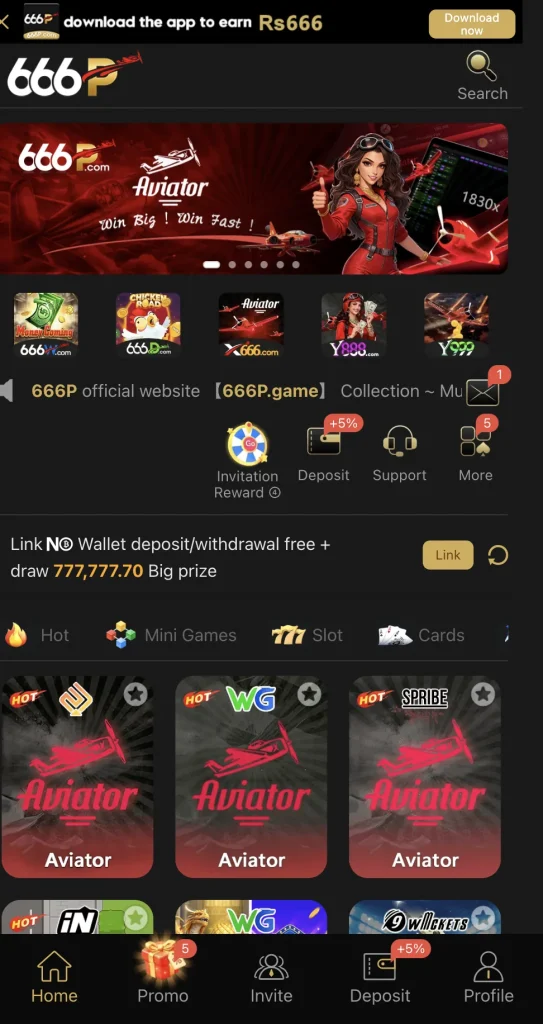
- First, wait until Hot and Mini Games finish loading.
- Then pick one room from a group you already read.
- Next, match the stake to the printed balance.
- Afterward, wait for settlement.
- Finally, skip a second room until the first round ends.
Shortcuts beside the tiles
Invitation Reward, Deposit, Support, and More sit in a row on Home. Download now sits in the header. Profile holds My Records, Manage withdrawal, Security Center, Language, Login device, Night mode, and Quit. Language currently reads English. Support is the in-app help control. Do not paste wallet PINs into chat. Another Android listing is 888M Game.
- First, use Search only for a title you already know.
- Then open Support from Home when a ticket stalls.
- Next, keep Language on English unless you switch on purpose.
- Afterward, review Login device on a shared phone.
- Finally, use Quit before you hand the handset over.
Opening a 666P Game ID in one sitting
allgamesapk.com.pk has no registration form. You create the ID on the operator page or inside the app after a package exists. A Google sign-in window opens from some operator sessions. Complete only the fields the form shows. Choose a login password you do not reuse on email. Tick 18+ if the form asks. Wait for Home, Deposit, and Profile before you send rupees. Another Android listing is VR66 Game.
- First, open Sign Up or Register on the operator page or in the app.
- Then complete only the fields on the form.
- Next, save the login password offline.
- Afterward, skip a second Sign Up.
- Finally, wait for Home before you tap Deposit.
Returning without a second Sign Up
Returning players use the saved member account. Enter the ID you already hold, then the login password. Wait for Home to load. Reset only from the in-app control. Log out with Quit on a shop phone. In-app Support handles a stuck login. Another Android listing is PG55 Game.
- First, confirm you opened 666P Game, not a clone bookmark.
- Then enter the ID you already hold.
- Next, wait for Home groups to load.
- Afterward, skip a second Sign Up.
- Finally, use Quit on a shared phone.
Pulling a 666P Game APK onto Android
The listing Download button has no stored operator page yet. Stay on allgamesapk. Skip copies from chat apps. Home also shows a Download now control after an operator page exists. Scan any later package with Play Protect. Refuse a renamed installer. More listings sit on the allgamesapk homepage.
- First, stay on this allgamesapk listing.
- Then refuse a chat installer.
- Next, wait for a stored Download destination.
- Afterward, scan the package with Play Protect.
- Finally, refuse a second installer with a different crest.
Unknown sources off after install
Allow unknown apps for the browser or Files app you used, then switch the permission off. Wait for Open. Android minimum stays unconfirmed, so read the installer prompt. Launch from the home screen. Close unknown-source access after Install. Another Android listing is CP77 Game.
| Step | Action |
|---|---|
| 1 | Open the file from Downloads. |
| 2 | Allow Android to install from this one source. |
| 3 | Wait for Open to appear. |
| 4 | Turn unknown-sources off once the icon sits on the home screen. |
Deposit rails on the 666P Game cashier
Open Deposit from Home or Profile while you are signed in. Online deposit lists No Wallet, JazzCash, Easypaisa, and BANK. Crypto lists USDT on TRC20, BEP20, and ERC20. Copy the amount from the form. Each rail prints a different min and max, so read the field before you send. Confirm the destination matches your own wallet. Easypaisa shows several QR channels. A recharge-fail notice asks you to switch channel. Plus-percent badges and chip extras are promo text. Wait for the balance to update before you stake. Another Android listing is H555 Game.
n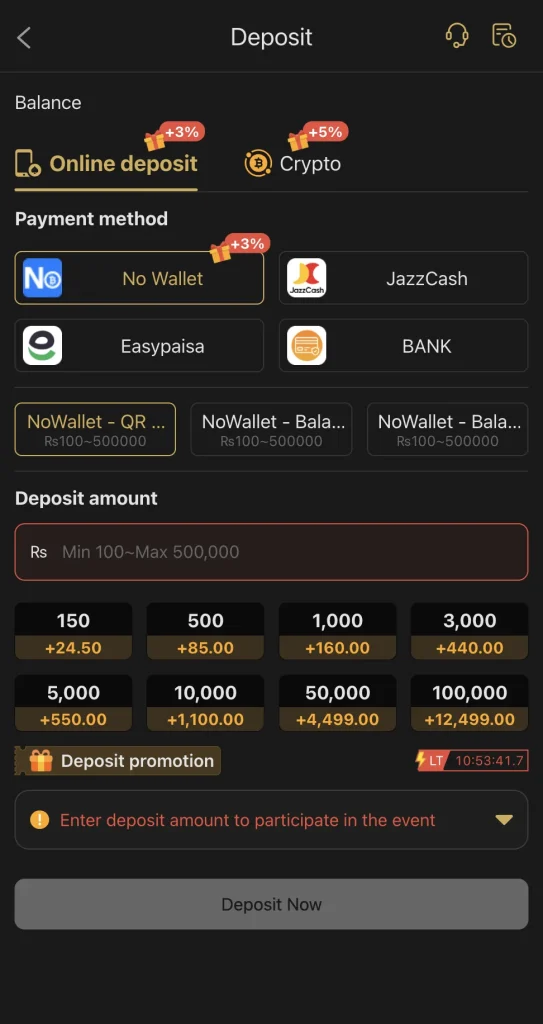
| Rail | Printed range on the cashier |
|---|---|
| No Wallet | Rs 100 to Rs 500,000 |
| JazzCash | Rs 100 to Rs 200,000 |
| Easypaisa QR | Read the band on the channel you pick |
| BANK | Rs 10,000 to Rs 300,000 |
| USDT TRC20 or BEP20 | 1 to 50,000 USDT |
| USDT ERC20 | 20 to 50,000 USDT |
- First, open Deposit while you are signed in.
- Then pick No Wallet, JazzCash, Easypaisa, BANK, or USDT.
- Next, copy an amount inside the printed range for the rail.
- Afterward, confirm the destination matches your own wallet.
- Finally, wait for the balance to update before you stake.
Cash-out after a withdrawal password
Withdraw sits on Profile beside Deposit. The first visit asks you to set a withdrawal password in six boxes, then confirm the same code. Store the code offline, separate from the login password. Request withdrawal offers No Wallet, Normal withdrawal, and Convert to crypto. Receiving account lists JazzCash, Easypaisa, Bank Transfer, No Wallet, Not Only Wallet copies of those rails, and Crypto. Add a receiving account before Confirm withdrawal will run. No Wallet prints a max of Rs 66,666. Copy figures from the live form. Timing and fees stay unconfirmed. Another Android listing is UP786 Game.
- First, set the withdrawal password when Profile asks.
- Then add JazzCash, Easypaisa, BANK, No Wallet, or Crypto as the receiving account.
- Next, open Request withdrawal.
- Afterward, enter an amount the available balance covers.
- Finally, submit once and wait on Withdrawal Records.
Promo, invite, and daily share banners
Promo holds Event, Mission, VIP, Unclaimed, and History. Banners include Daily Share, a limited-time invite line, Weekly Sharing, and No Wallet deposit perks. Invitation Reward on Home opens a draw wheel and task list. An effective-referral note asks for subordinate betting at or above Rs 100. VIP V0 prints a deposit target of Rs 100 and a bet target of Rs 800. Read the terms on each card before you claim. Banner rupees are ads, not a wage. Another Android listing is Y888 Game.
- First, open Promo and read the card you intend to claim.
- Then skip a bonus whose turnover you will not finish.
- Next, use Invite only with people who already asked.
- Afterward, treat Daily Share and lucky-draw chests as promo.
- Finally, leave Home once the cash limit is gone.
A cleaner 666P Game session
Copy cashier amounts, not jackpot tickers or lucky-draw rupees. Keep wallet PINs out of game chat. Use in-app Support for a stuck ticket. Log out with Quit on a shared phone. Update Profile details when your number or wallet changes. Wait for Home on a stable connection. Another Android listing is win 786. Also see 1777 PKR Game.
- First, scan the package with Play Protect.
- Then stake money you accept losing.
- Next, log out on a shop phone.
- Afterward, use in-app Support for a stuck ticket.
- Finally, leave Home when the limit is gone.
What helps vs what stays on you
Use this pair of lists before you send rupees. None of the lines below is a promise of profit. Promo copy on Home is still an ad. Another Android listing is 999Q Game.
| Works in your favour | Stays on you |
|---|---|
| JazzCash, Easypaisa, BANK, No Wallet, and USDT on the cashier | Play Store listing stays unconfirmed, so treat the client as a sideload |
| Home groups from Hot through Sports in one picker | Each deposit rail prints a different min and max |
| Withdrawal password plus a bind step on Receiving account | Banner rupees on Promo are ads, not a credited wage |
| Security Center, Login device, and Quit on Profile | The listing Download button has no stored file URL yet |
If 666P Game stalls on cash-out
A missing receiving account, a skipped withdrawal password, or Sign In on a clone bookmark causes most stalls. Add the rail from Receiving account, then retry one request. If an Easypaisa recharge fails, switch channel instead of sending a second copy of the same amount. Retry Sign In once. Then reset from the operator control. Skip a second installer until the first package finishes. Another Android listing is 8557 Game.
- First, check the password and the network.
- Then retry Sign In once.
- Next, add a receiving account if cash-out asks.
- Afterward, switch channel if a recharge fails.
- Finally, wait on one pending cashier request instead of sending two.
666P Game is a PKR casino lobby Pakistan players open for Hot rooms, Mini Games, Slot, Cards, Fishing, Live, and Sports.
The listing Download button has no stored operator page yet. Stay on allgamesapk. Scan any later package with Play Protect.
Online deposit lists No Wallet, JazzCash, Easypaisa, and BANK. Crypto lists USDT on TRC20, BEP20, and ERC20.
Play Store listing stays unconfirmed. Treat the client as a sideload.
Withdraw on Profile asks you to set a withdrawal password in six boxes before Request withdrawal will run.
Last checks
Scan the package with Play Protect before you open Home. Refuse a second installer with a different crest.