
How CD22 Game Handles Sign-In, Deposit, and Cash-Out
| Updated | Just Now |
Description
CD22 Game is an Urdu casino lobby Pakistan players open for slots, live tables, fishing, and a rupee cashier. JazzCash and EasyPaisa sit on Deposit. allgamesapk lists CD22 Game. allgamesapk does not run the servers. Sign in first. Then open Deposit only after Home loads.
What CD22 Game is for a Pakistan player
CD22 Game is a real-money casino lobby with an Urdu interface and an English toggle. Users searching for CD22 Game are generally looking for a rupee cashier plus one Game Center for slots, live tables, and fishing. Version, size, Android floor, developer, and Play Store listing stay unconfirmed. Follow the current Home screen for live tiles.
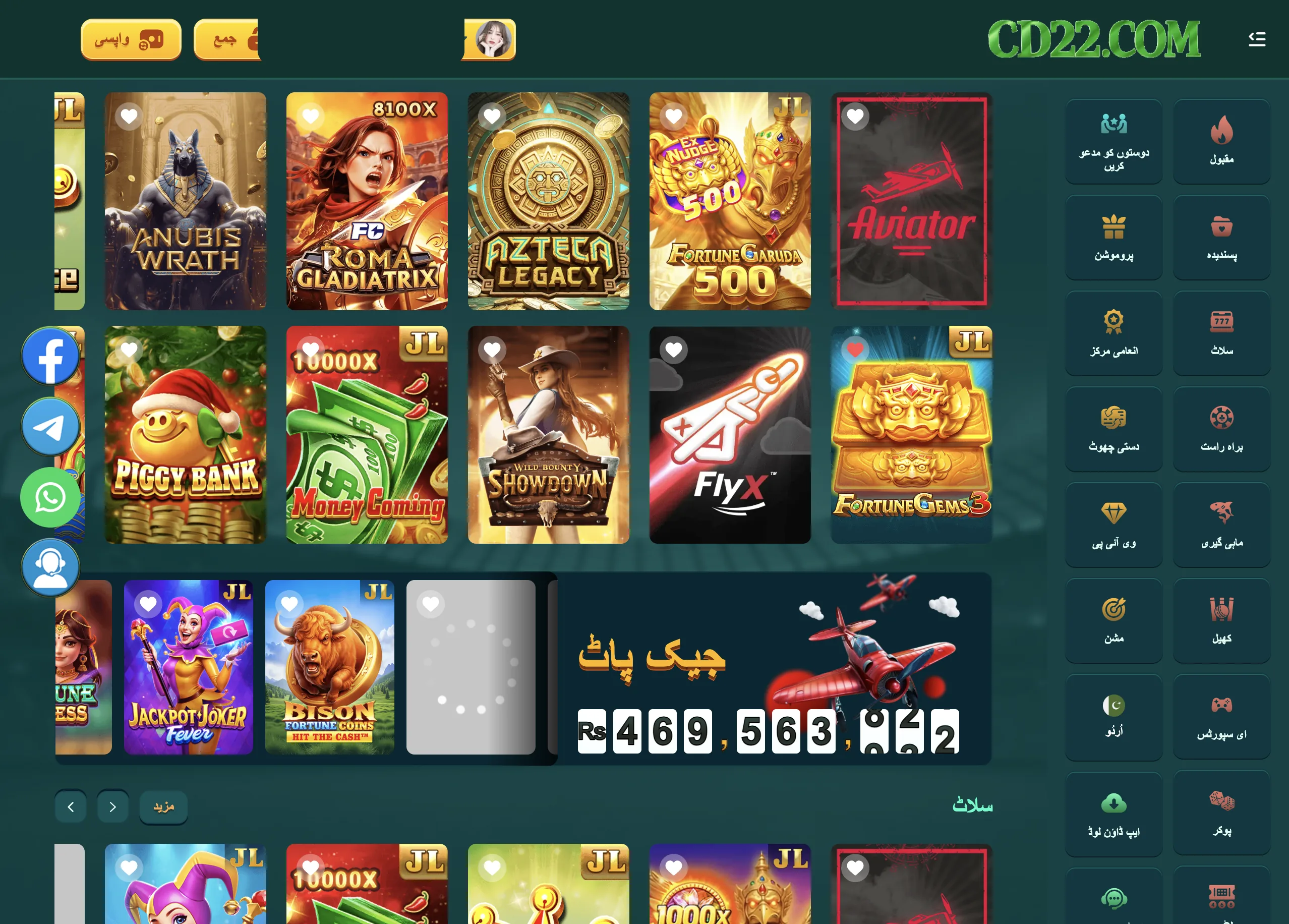
Game Center groups Popular, Favorites, Slots, Live, Fishing, Cards, E-Sports, Poker, and Lottery. Named Popular tiles include Aviator, Fortune Gems 3, and Money Coming. Those tiles change. Deposit and Withdraw sit in the header once an ID is open. Personal Center holds deposit records, bet records, and cash-out. CD22 Game is not a salary app. Jackpot tickers and lucky-wheel banners are promo text, not money already credited. Set a cash limit before the first stake. Treat a round as entertainment. Play is for users 18 and older. Another Android listing is F444 Game. More titles sit in Games.
| Item | On this listing |
|---|---|
| Version | Not independently confirmed |
| Size | Not independently confirmed |
| Android | Not independently confirmed |
| Languages | Urdu, English |
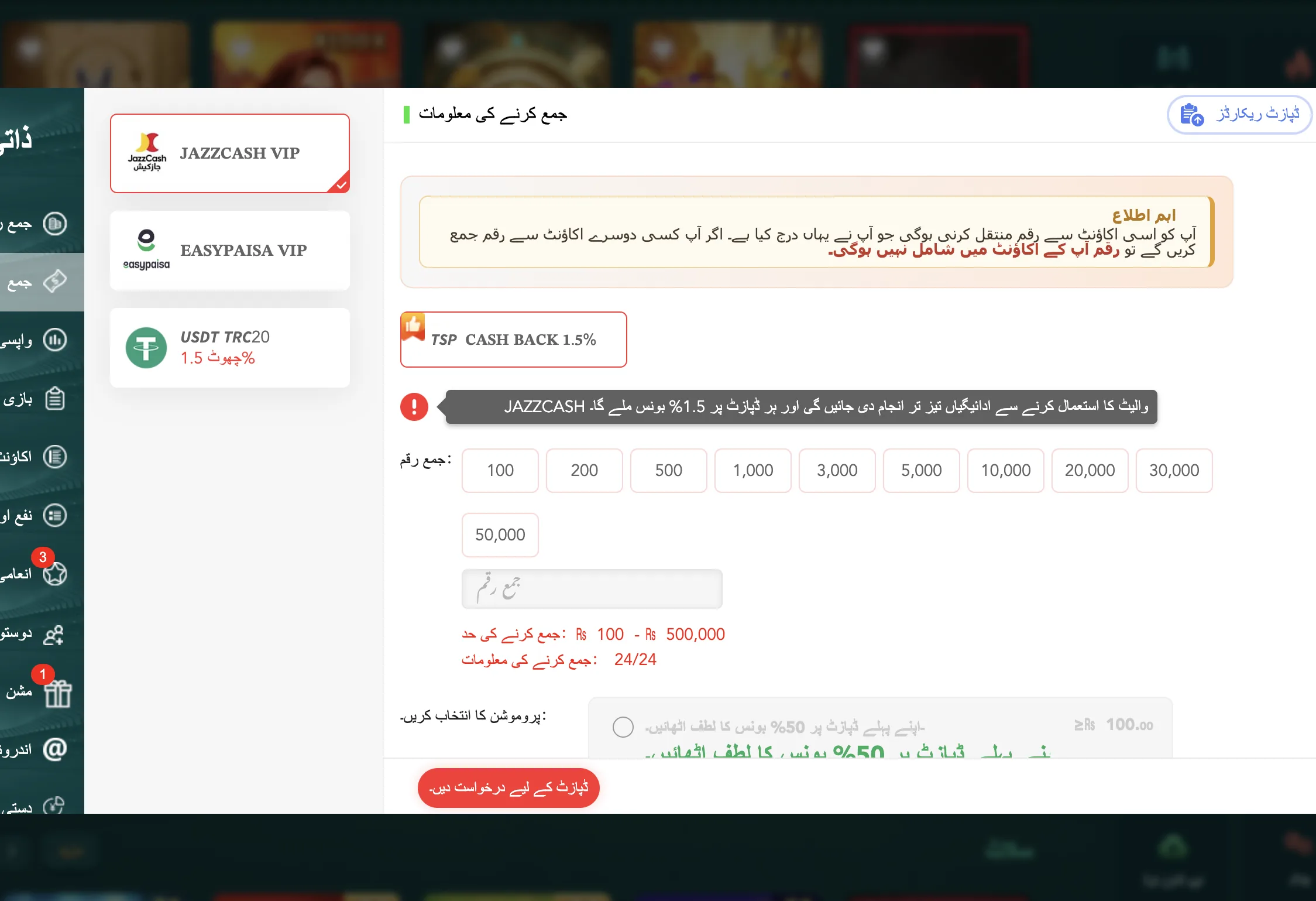
| Wallets | JazzCash, EasyPaisa, USDT TRC20 |
| Deposit range on cashier | Rs 100 to Rs 500,000 |
| Google Play | Not independently confirmed |
| Developer | Not independently confirmed |
Upsides and trade-offs before you stake
Use this pair of lists before you send rupees. None of the lines below is a promise of profit. Promo copy on Home is still an ad. Another Android listing is PG55 Game.
| Works in your favour | Stays on you |
|---|---|
| Urdu lobby plus an English toggle | Play Store listing stays unconfirmed, so treat the client as a sideload |
| JazzCash and EasyPaisa on Deposit and cash-out | Bind a mobile number before some deposit rails will run |
| Slots, Live, Fishing, Cards, Poker, and Lottery in one Game Center | Cash-out waits until turnover on the withdraw form is finished |
| Deposit range printed on the cashier: Rs 100 to Rs 500,000 | Send rupees only to the account the cashier names. A transfer to a third party does not credit |
Open a CD22 Game ID on day one
allgamesapk.com.pk has no registration form. You create the ID on the operator page or inside the app after a package exists. Fill the phone or email fields the screen shows. Choose a password you do not reuse on email. Tick 18+ if the form asks. Wait for Home, Deposit, and Withdraw before you send rupees. Another Android listing is VR66 Game.
- First, open Sign Up or Register on the operator page or in the app.
- Then complete only the fields on the form.
- Next, save the password offline.
- Afterward, skip a second Sign Up.
- Finally, wait for Home before you tap Deposit.
Return through Sign In
Returning players use Sign In with the same member account. Enter the saved ID, then the login password. Wait for Home to load. Reset only from the in-app forgot-password control. Log out on a shared phone. In-app Customer Service handles stuck logins. Another Android listing is 888M Game.
- First, confirm you opened CD22 Game, not a clone bookmark.
- Then enter the ID you already hold.
- Next, wait for Game Center to load.
- Afterward, skip a second Sign Up.
- Finally, log out on a shop phone.
Game center rooms after Home loads
The lobby is a picker. Open one title from Popular, Slots, Live, Fishing, Cards, E-Sports, Poker, or Lottery. Confirm the stake against the rupee balance. Wait for settlement. Skip a second title until the first round ends. Jackpot figures and lucky-wheel prizes are promo text. Another Android listing is H555 Game. Also see 92 Blaze.
- First, stay on Home until Game Center loads.
- Then open one title you already understand.
- Next, confirm the stake against the rupee balance.
- Afterward, wait for settlement.
- Finally, skip a second title until the first round ends.
How do I deposit on CD22 Game?
Deposit sits in the header as جمع. Open Deposit while you are signed in. Rails on the cashier are JazzCash VIP, EasyPaisa VIP, and USDT TRC20. Copy the amount from the form. The printed range is Rs 100 to Rs 500,000. Confirm the destination matches your own wallet. A notice on the form says a transfer to someone else will not credit. Bind a mobile number if the cashier asks before the request runs. Wait for the balance to update before you stake. Promo cards such as a first-deposit extra or a 1.5 percent cash-back line are ads, not money already in the account. Another Android listing is PKR365 Game.
- First, open Deposit while you are signed in.
- Then pick JazzCash, EasyPaisa, or USDT TRC20.
- Next, copy an amount inside the printed Rs 100 to Rs 500,000 range.
- Afterward, confirm the destination matches your own wallet.
- Finally, wait for the balance to update before you stake.
Cash-out once turnover is done
Withdraw sits in the header as واپسی and again under Personal Center. JazzCash and EasyPaisa appear as e-wallets. Bind a receiving account first. The form asks for a payment password. Complete the turnover note on the screen before you submit. Withdraw time on the form reads 24 hours. Fees on a later screen stay unconfirmed, so copy figures from the form. A closed channel message means pick the other wallet instead of sending a chat transfer. Another Android listing is UP786 Game. Also see 777 DX Game.
- First, bind JazzCash or EasyPaisa as the receiving account.
- Then open Withdraw from the header or Personal Center.
- Next, enter an amount the available balance covers.
- Afterward, finish the turnover line and enter the payment password.
- Finally, submit once and wait on the record screen.
Getting the CD22 Game file onto a phone
The listing Download button has no stored operator page yet. Stay on allgamesapk. Skip copies from WhatsApp, Telegram, or Facebook. Home also shows an App Download control in the right rail after an operator page exists. Scan any later package with Play Protect. Refuse a renamed installer. More listings sit on the allgamesapk homepage.
- First, stay on this allgamesapk listing.
- Then refuse a chat installer.
- Next, wait for a stored Download destination.
- Afterward, scan the package with Play Protect.
- Finally, refuse a second installer with a different name.
Allow unknown sources for one install
Allow unknown apps for the browser or Files app you used, then switch the permission off. Wait for Open. Android minimum stays unconfirmed, so read the installer prompt. Launch from the home screen. Close unknown-source access after Install. Another Android listing is CP77 Game. Also see P999 Game.
| Step | Action |
|---|---|
| 1 | Open the file from Downloads. |
| 2 | Allow Android to install from this one source. |
| 3 | Wait for Open to appear. |
| 4 | Turn unknown-sources off once the icon sits on the home screen. |
Session habits for the CD22 cashier
Copy cashier amounts, not jackpot tickers or lucky-wheel rupees. Finish turnover before you tap Withdraw. Keep wallet PINs out of game chat. Use in-app Customer Service for a stuck ticket. Log out on a shared phone. Promotion, Mission, VIP, and Invite rooms advertise extras. Treat those figures as promo. Another Android listing is Y888 Game. Also see win 786 and 1777 PKR Game.
- First, scan the package with Play Protect.
- Then stake money you accept losing.
- Next, log out on a shop phone.
- Afterward, use in-app Customer Service for a stuck ticket.
- Finally, leave Home when the limit is gone.
When CD22 Game stalls on Deposit
A missing mobile bind, a closed JazzCash channel, or Sign In on a clone bookmark causes most stalls. Bind the number from the cashier notice, then retry one rail. If the form says the channel is closed, switch to EasyPaisa instead of a second JazzCash request. Retry Sign In once. Then reset from the operator control. Skip a second installer until the first package finishes. Another Android listing is 8557 Game. Also see 999Q Game and Y999 Game.
- First, check the password and the network.
- Then retry Sign In once.
- Next, bind the mobile number if Deposit asks.
- Afterward, switch wallet if the form says the channel is closed.
- Finally, wait on one pending cashier request instead of sending two.
People also ask
CD22 Game is an Urdu casino lobby for Pakistan with Popular, Slots, Live, Fishing, Cards, E-Sports, Poker, and Lottery. JazzCash and EasyPaisa sit on Deposit.
The listing Download button has no stored operator page yet. Stay on this allgamesapk listing. Skip chat installers. Scan any later package with Play Protect.
No. Jackpot tickers and lucky-wheel banners are promo text, not money already in the balance. Copy cashier amounts, not banner rupees.
JazzCash VIP, EasyPaisa VIP, and USDT TRC20 sit on the cashier. The printed deposit range is Rs 100 to Rs 500,000. Bind a mobile number if the form asks.
Yes. Complete the turnover note on the Withdraw form before you submit. JazzCash and EasyPaisa appear as e-wallets. Withdraw time on the form reads 24 hours.
Last checks
Close unknown-source access after Install. Leave Home once the cash limit is gone.